
A mixer built for real sessions
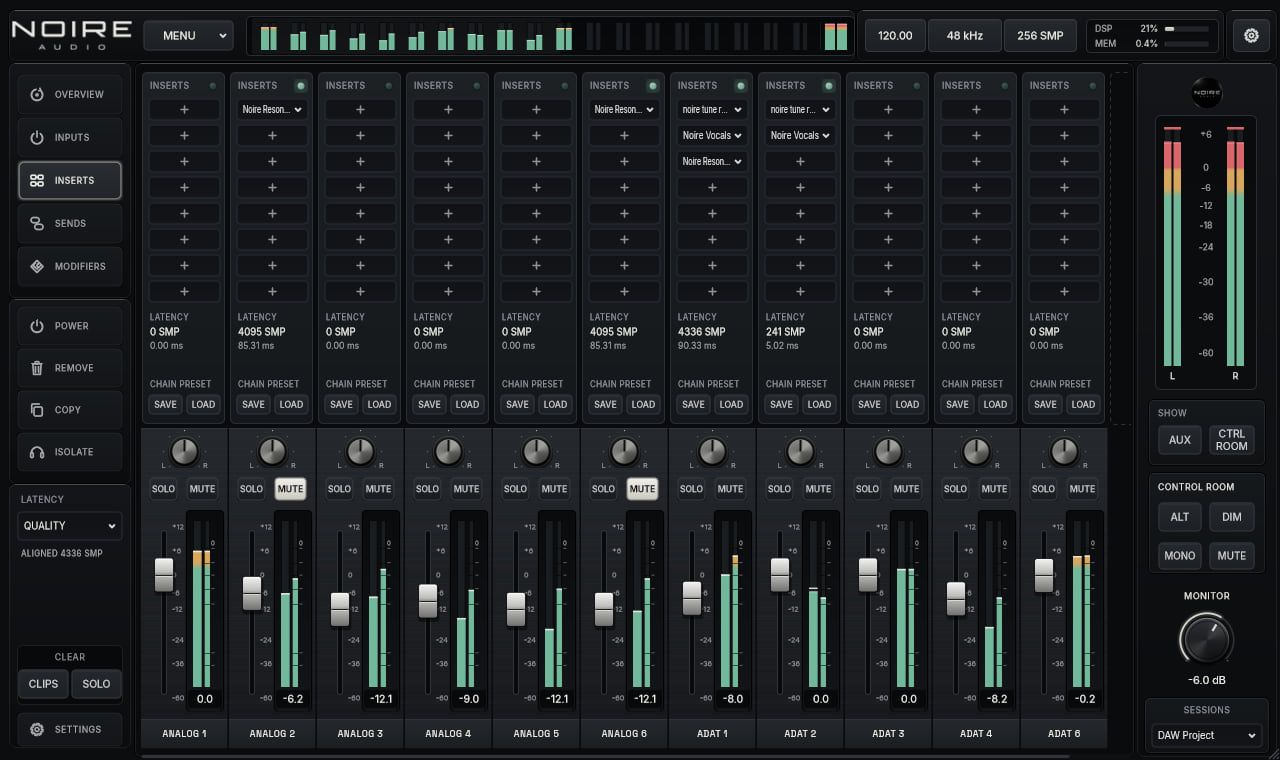
Work with up to 32 channels, four Aux returns and four Cue mixes. Main and alternate monitor paths, mono, mute and dim controls sit beside the mix.
MixingProduct preview
A mixer and monitor controller for the sessions you want to keep in one place.
Bring inputs, returns, cue mixes and inserts into a single native Windows console. Use it on its own or load it as a VST3 effect.
Current preview 0.4.0 · VST3 · Standalone
In a session
The standalone version handles your audio device and session. Inside a DAW, the VST3 version works with the inputs and outputs the host exposes, so available routing depends on that host.
What it does
Bring inputs, returns, cue mixes and inserts into a single native Windows console. Use it on its own or load it as a VST3 effect.
Work with up to 32 channels, four Aux returns and four Cue mixes. Main and alternate monitor paths, mono, mute and dim controls sit beside the mix.
Load VST3 effects on channels or the master. Send signals to Aux and Cue buses, create direct outs and save the routing with the session or a reusable preset.
Choose LIVE, BALANCED or QUALITY latency profiles, trim the Main and ALT outputs independently, and keep talkback and cue levels close by.
At a glance
Shop
We’re preparing prices and downloads. In the meantime, each page shows what the plugin does and the formats available. No purchase or download link is active yet.